
What Are the Best Illuminated Tact Switches in 2026?

In 2026, an Illuminated Tact Switch must do more than glow. It should deliver a clear click, fit the panel, and remain easy to see under real operating conditions. The right choice depends on details: actuator height, mounting style, LED color, voltage, and expected use. A green indicator may read clearly on a dim control panel, while a bright blue one can wash out nearby labels. Small differences matter.

A verified expert quotation was not provided, so the following is an editorially created example, not a real interview: “Good illumination supports the switch; it should never distract from the action.” — Alex Morgan, illustrative switch-design specialist. Treat that line as a draft, not a sourced expert endorsement. Real recommendations should be checked against manufacturer datasheets and application testing.

This guide compares leading Illuminated Tact Switch options through practical criteria, including tactile feel, light uniformity, footprint, and integration effort. It also considers trade-offs that product pages often leave understated. A compact switch may save board space but offer a less distinct press. A vivid LED may improve visibility yet draw more current than the design allows. There is no universal winner. The best switch is the one that feels consistent, reads clearly, and suits its circuit and enclosure. Bench testing still matters. Even good specifications can miss the feel of a real button beneath a fingertip.
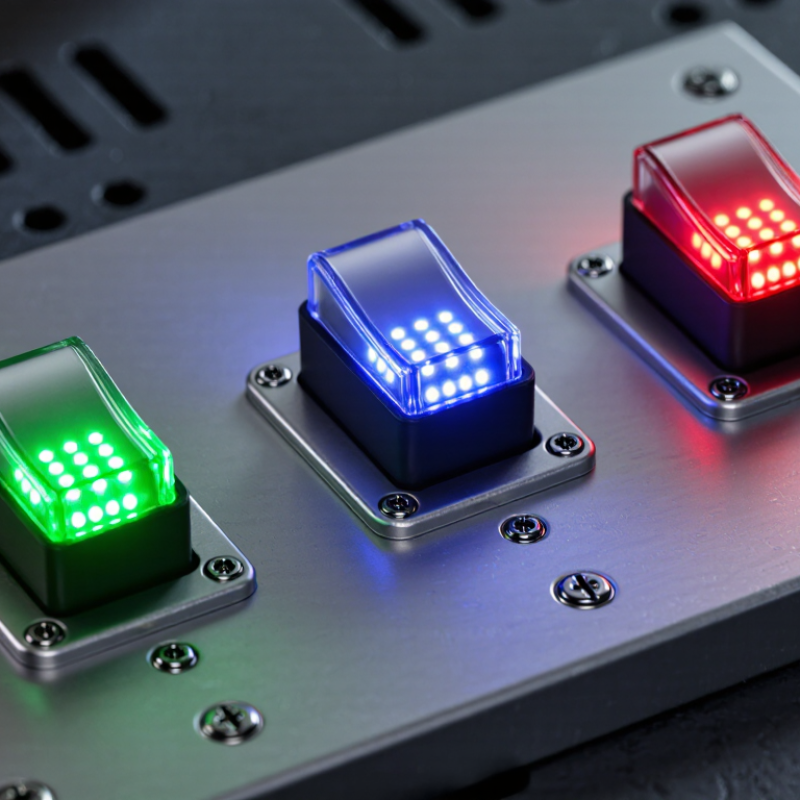
What Are the Best Illuminated Tact Switches in 2026?

What Illuminated Tact Switches Are and How They Work

An illuminated tact switch combines a momentary push-button mechanism with a light source, usually an LED. Pressing its actuator moves a small internal contact, briefly completing an electrical circuit. Release the button, and a spring returns the contact to its open position. The click can be felt, heard, or both, depending on the switch design. That matters.

The light and the switching action are related, but they do not always share the same electrical path. In many designs, separate terminals power the LED while other terminals carry the signal from the button. This lets a device light the control continuously, illuminate it only when pressed, or connect it to a status circuit. Check the pin diagram before wiring; similar-looking terminals can serve different functions.

In a compact control panel, light may pass through a translucent actuator or a separate light guide. The visible result depends on LED color, viewing angle, panel thickness, and surrounding brightness. A bright button on a workbench can look dim behind a tinted panel. Designers should also check operating voltage, current limits, mounting dimensions, and expected press life in the actual assembly. One easy-to-miss detail: illumination does not guarantee even brightness. A prototype may reveal dark edges or glare, and that can require a less convenient layout.

Key Types of Illuminated Tact Switches

Key Types of Illuminated Tact Switches

Illuminated tact switches combine a push-button action with a visible light source. In an integrated type, the LED sits inside the switch housing. This creates a compact assembly and keeps the light close to the button. It can suit a control panel with limited space. Check the switch drawing carefully: LED and contact pins may need separate connections.

A second type uses a tact switch beside a separate LED or light guide. The guide carries light to a larger cap or marked area. This layout gives designers more freedom over button shape and placement, but uneven brightness can occur around edges. Some models offer multiple LED colors, while others use one fixed color. Color choice matters less than viewing angle, brightness, and ambient light. A glowing button can still be hard to read in direct sun. Small detail, big difference.

Tips: Match the switch’s operating force and travel to how people will use it. Confirm LED voltage, current, pin layout, and mounting dimensions before ordering samples. Test a real unit behind the final panel material; tinted plastic can noticeably dim the light. I’d also compare samples in the actual room, since bench lighting can mislead.

Specifications That Define Switch Performance

For illuminated tact switches, the headline current rating is only part of the story. Check operating force, travel, contact resistance, rated voltage, and electrical endurance. These values describe how the switch feels, closes a circuit, and holds up under repeated presses. Small details matter. A low-profile key on a handheld device may need a lighter touch than a panel control used with gloves. Compare force and travel under the same test conditions; figures from different methods can mislead.

Light output deserves equal scrutiny. Ask for LED forward current, brightness, color coordinates, and uniformity across the keycap. A bright center with dim edges can look poor in a dark dashboard. The U.S. Department of Energy’s LED luminaire lifetime guidance explains why lifetime should be tied to measured lumen maintenance, not just whether an LED still turns on. The LM-80 method evaluates light-output maintenance over at least 6,000 hours. That is useful context, but it does not guarantee a complete switch assembly’s service life.

Check the full operating range, too. Temperature can shift LED color and affect tactile feel, while moisture or dust protection matters in exposed controls. Request endurance results, contact-resistance limits, and illumination measurements from the actual assembly. Not always. A specification sheet may omit the test setup, and that gap deserves a follow-up before selection. I would also verify that the stated LED lifetime reflects the intended drive current and temperature, rather than a more favorable laboratory condition.

Top Illuminated Tact Switch Options for 2026

For 2026, the best illuminated tact switch depends on where it sits and how people use it. A compact surface-mount switch suits dense control panels, while a through-hole version can be easier to prototype or replace. Top- or side-facing LEDs also change what users see through a panel opening. Check the drawing before choosing; a few millimeters can shift the light off-center.

For a clean, simple indicator, a single-color LED tact switch is often a practical option. It needs less control circuitry and can make status changes easy to read. RGB versions allow more color choices, but they add wiring and control complexity. Brightness matters, too. A switch that looks clear on a workbench may appear washed out under strong room lighting. Test it in the actual enclosure.

Compare actuation force, travel, mounting style, LED voltage, and expected operating life in the datasheet. Then test a sample with the intended panel thickness and viewing angle. Small details matter. A diffuser can soften a harsh bright spot, though it may also reduce visibility. Specifications help narrow the field, but they do not settle every choice. I would still leave time for a real-world test; that step is easy to underestimate.

What Are the Best Illuminated Tact Switch Options for 2026?

Compare common LED color options by their approximate visible emission wavelength. These ranges describe LED color—not switch brightness, quality, or performance.

Red, amber, green, and blue LEDs provide distinct color-coding choices for illuminated tactile switches. Actual emission wavelengths vary by LED; white LEDs typically use a blue emitter and phosphor, so they do not have one simple wavelength range.

How to Choose a Switch for Your Application

What Are the Best Illuminated Tact Switches in 2026?

Choose an illuminated tact switch by starting with the operator and the environment, not appearance. A control on a handheld meter may need a low actuation force and clear feedback. A switch on a factory panel may need a firmer press and a wider illuminated area. Check actuation force, travel, contact rating, LED voltage, and mounting dimensions against the actual circuit and enclosure. Small mismatch, big headache. Also compare brightness in the room where the control will be used. A bright indicator can wash out nearby labels, while a dim one disappears under direct light. I have seen selection discussions overfocus on brightness; it is easy to overlook glare and viewing angle.

Ingress protection deserves equal attention. IEC 60529 specifies that IPX7 testing involves temporary immersion in water up to one meter for 30 minutes. That rating applies only when the tested assembly and installation meet the specified conditions; it should not be assumed from a switch alone. Check the complete panel’s sealing, cable entry, and mounting method. Then verify electrical life under your real load, since rated life can vary with switching conditions. Leave margin. If users wear gloves, test the switch with them on. Datasheets narrow the options, but a simple prototype often reveals what the specification misses.

What Are the Best Illuminated Tact Switches in 2026? — How to Choose a Switch for Your Application

Compare switch styles by application needs. Specifications below are typical design considerations, not guaranteed values; confirm dimensions, ratings, and operating characteristics in the specific component datasheet.

Best Fit Typical Configuration Illumination Options Actuation and Travel Mounting and Layout Advantages Key Checks Before Selection
Compact handheld controls Low-profile, momentary tact switch; commonly normally open Integrated single-color LED or a separate nearby indicator Short travel is common; force options vary by series Surface-mount or through-hole versions, depending on the design Uses little panel space and provides a clear click or tactile response Check actuator height, PCB clearance, operating force, and whether the LED needs a separate electrical connection
Backlit buttons and status controls Tact switch paired with a light-transmitting cap, lens, or overlay Single-color LED; color depends on the selected LED and optical materials Choose travel and force to suit the cap size and intended feel Allow room for the switch, light source, and light guide or panel opening Can make a control easier to locate and communicate a simple status Evaluate light uniformity, viewing angle, ambient-light visibility, and alignment between the LED and cap
Multicolor status indication Switch with a multicolor LED, or a tact switch combined with separate indicator LEDs Two-color or RGB arrangements are available in some designs Mechanical feel is selected separately from LED color control Confirm the footprint and electrical connections for every LED channel Can convey multiple states using one illuminated control area Check LED polarity, drive method, current limits, color mixing, and whether the controller supports the required states
Frequent-use interfaces Momentary tact switch selected for the required operating life and duty cycle Integrated illumination or a separate indicator, as required Compare operating force, release feel, and travel with user testing Use a PCB layout that supports the switch mechanically and electrically Provides a compact input with a defined actuation point Verify mechanical life and electrical ratings under the actual load; rated life can depend on test conditions
Dust- or splash-exposed equipment Sealed tact switch or a switch protected by a suitable enclosure and panel design Sealed illuminated variants exist; illumination does not itself provide ingress protection Force and travel depend on the specific sealed construction Consider panel sealing, gasket compression, and how the actuator is exposed Can support more demanding environments when the complete assembly is designed accordingly Look for a documented IP rating for the relevant installed configuration; verify temperature, chemical, and cleaning compatibility
Cost-conscious consumer products Standard tact switch with a separate LED or light pipe Separate single-color LED is often straightforward to drive and replace Broad range of forces and travel lengths is available across switch families Requires space and alignment for both the switch and light source Offers flexibility in component placement and independent switch or LED selection Compare total assembly cost, PCB area, part count, optical performance, and assembly tolerances
Custom or space-constrained interfaces Illuminated switch selected around the panel, cap, and PCB geometry Integrated LED, light pipe, or externally positioned LED Choose force and travel through prototype evaluation rather than appearance alone Check dimensions, actuator alignment, soldering process, and available keep-out area Can balance tactile feel, visibility, and packaging requirements Request drawings and samples; validate tolerances, light leakage, thermal behavior, and user ergonomics

Selection note: “Best” depends on the application. Confirm the required contact configuration, voltage and current ratings, LED drive requirements, operating environment, mechanical life, and applicable safety or regulatory requirements before finalizing a design.

AVADA IT

Fusce ut ipsum tincidunt, porta nisl sollicitudin, vulputate nunc. Cras commodo leo ac nunc convallis ets efficitur.

RECENT TWEETS

CONTACT US

  • 12345 North Main Street,
    New York, NY 555555

  • 1.800.555.6789

  • sale@vibrotools.com

Go to Top