
A Cold Foil Printing Machine can add a bright metallic finish without a heated stamping die, but the right choice depends on the work it must repeat. A narrow web label press and a wide-format packaging line face different demands. Foil transfer, registration, running speed, substrate range, and waste during setup all deserve close inspection. The sample on a showroom table is not enough.
Smithers’ report, The Future of Global Packaging to 2028, forecasts continued growth in packaging demand, making dependable finishing capacity an important purchasing consideration. Yet a growing market does not guarantee a return on every machine. Ask suppliers for production trials using your own stock, artwork, adhesive, and target speed. Watch the foil edge under magnification. Check whether fine text stays clean after a long run.
A precise expert quotation needs a verifiable source. No source article or interview was provided, so attributing a made-up statement to a named specialist would be misleading. Keep this principle in mind: “Buy for repeatable results, not the showroom sample.” The following seven tips examine practical checks, from web handling and registration control to service access and total operating cost. One detail is easy to overlook: the best-looking test sheet may hide slow changeovers or excessive foil waste. Judge the machine on a complete job, not one impressive impression.
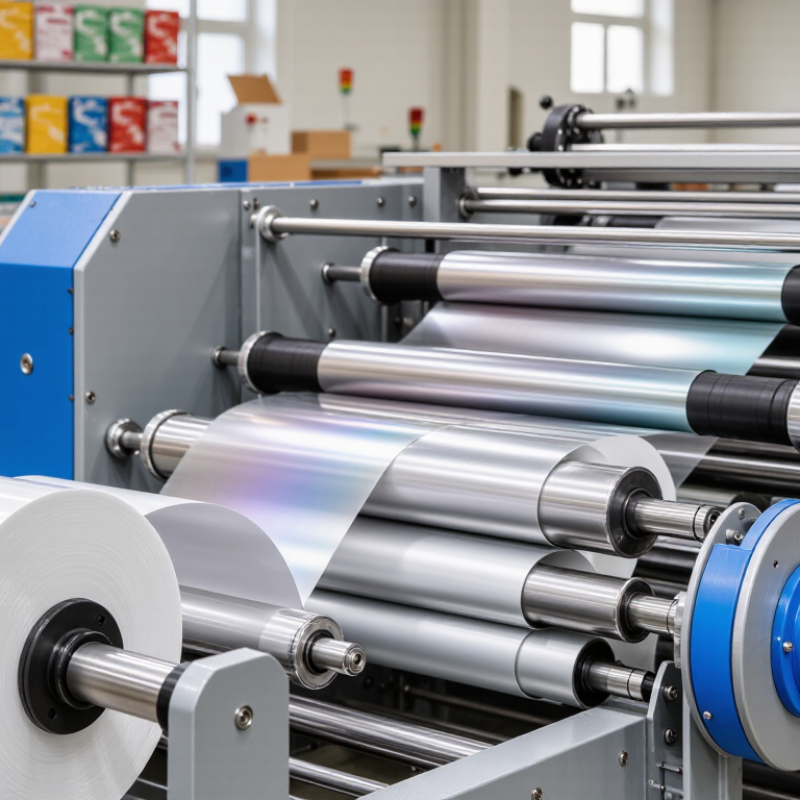
Define the job before comparing machine specifications. List the substrates you run, such as coated paperboard, labels, or folding cartons. Note their thickness, sheet or web width, and surface finish. Cold foil transfer depends on adhesive behavior and consistent pressure, so a rough or absorbent stock may need testing before purchase.
Then describe the foil applications in practical terms. Are you covering broad panels, narrow lettering, fine lines, or small metallic accents? Record the usual image area and the tightest registration you need against printed colors. A machine suited to large, simple areas may struggle with delicate details at production speed. Ask for a sample run using your actual stock, adhesive, and artwork. Check the foil edges closely.
Volume matters, but so do job changes. Estimate typical run lengths, peak weekly output, and how often operators switch foil widths or substrates. Fast running speed is useful only when setup, alignment, and waste remain manageable. Keep a record of setup time and rejected sheets during trials. It is easy to overlook these costs. Your first estimate may be wrong; production patterns often change after new customers or formats arrive. Leave some capacity for that uncertainty, rather than choosing solely for today’s most common job.
Example monthly job mix for planning a cold foil press purchase. Use your own production data to determine the required web width, running speed, substrate compatibility, and changeover capacity. The percentages below are illustrative, not market statistics.
A machine should suit the applications you run most often while still accommodating less frequent jobs. Confirm its supported materials, foil options, registration capability, and practical operating speed with your actual specifications.
A cold foil unit should fit the press’s working width, speed range, and web path. Check how the module mounts and whether the press can hold steady tension through the foil station. Even slight web drift can blur fine type or leave foil edges uneven. Registration also matters: compare the press’s repeat length and controls with the design’s foil details. Small details matter. Ask for a trial using your actual stock, not just a sample roll supplied for demonstration.
Substrate and ink compatibility need equal attention. Coated paper, uncoated paper, and film can behave differently; porous sheets may absorb adhesive unevenly, while slick surfaces may need specific preparation. Confirm the stock’s caliper and surface finish with the machine supplier, then inspect adhesion after curing and finishing. The adhesive ink must be designed for cold foil, and its curing requirements should match the press’s UV or other curing system. Do not assume that a familiar ink will bond well. Test the full sequence, including overprinting, varnish, and rub resistance. I have seen a clean foil impression become less convincing after downstream finishing. A small production trial may feel inconvenient, but it can reveal issues that a specification sheet misses.
When comparing cold foil machines, inspect transfer quality under the same foil, ink, substrate, and press speed. Look closely at solid areas for pinholes, mottling, dull patches, and foil lifting around fine type. Then check registration at start-up and after a sustained run. A sharp sample from a short test can hide drift once the machine warms up. Ask for measured register variation, not just a claim of “high accuracy,” and confirm how the system detects and corrects movement. Small flaws matter.
Smithers’ The Future of Global Packaging to 2028 valued the worldwide packaging market at about $1.17 trillion in 2023. That scale makes repeatable decoration commercially important, but it does not prove any machine’s performance. Request a trial using your actual artwork, including thin rules and small reversed text. Compare edge alignment against printed register marks, and record waste during setup and steady production. ISO 12647-2 provides process-control guidance for offset printing, but it is not a universal cold-foil tolerance; agree on job-specific limits before testing. I would still question results based on one clean sample. Ask for several consecutive sheets, then inspect them under consistent lighting and magnification.
A cold foil machine’s rated speed is only a starting point. Ask for the speed range at the sheet size and stock thickness you actually use. Then run a representative job, including setup and changeover time. A press that reaches a high speed but needs frequent stops may deliver fewer finished sheets per shift. Watch the foil feed, registration marks, and waste at startup. Small slips matter.
Automation can reduce repetitive adjustments, but it should be easy to monitor. Check whether the system alerts operators to foil breaks, misfeeds, or registration drift. Ask how quickly a trained operator can correct a fault without restarting the entire run. Controls should show clear settings for pressure, temperature, and feed speed, where applicable. Too many hidden menus slow people down. A neat demonstration is not always a real production shift.
Ease of operation also depends on cleaning, loading rolls, and changing jobs. Have the people who will run the machine test these tasks, not just the purchasing team. Note how long a foil roll change takes and whether common adjustment points are reachable without awkward stretching. Keep a simple trial log: job, speed, stoppages, setup minutes, and usable output. I would not trust one short test alone; paper behavior can vary, and the results may be less tidy on a busy day.
| Tip | Evaluation area | What to verify | Practical acceptance check | Why it matters |
|---|---|---|---|---|
| 1. Match speed to the job | Running speed and usable output | Compare the quoted running speed with the speed achieved on your actual substrate, foil coverage, and print layout. Ask whether the stated figure is a maximum or a sustained production speed. | Run a representative job at the required production speed and record good sheets or metres per hour, not just the machine’s top-speed setting. | Cold foil performance can depend on job design, material, registration demands, and downstream equipment. A headline speed may not reflect saleable output. |
| 2. Test registration stability | Foil-to-print alignment | Review the registration controls, sensors, correction range, and setup procedure. Test fine details and repeat patterns as well as broad foil areas. | Agree on a job-specific registration tolerance before the trial, then check samples from the beginning, middle, and end of the run. | Stable alignment helps prevent visible misregistration and reduces material waste, especially on detailed designs. |
| 3. Assess automation | Setup, monitoring, and changeover | Check for automated tension control, guided setup, recipe storage, fault alerts, and automatic adjustments where relevant. Confirm which tasks still require operator intervention. | Time a changeover between two representative jobs and list the steps that are automatic, manual, or dependent on operator experience. | Automation can improve repeatability and reduce routine adjustments, but its value depends on how well it fits the production workflow. |
| 4. Check ease of operation | Controls and operator workflow | Have intended operators set up, start, adjust, and stop the machine. Review control-screen clarity, access to settings, and the visibility of warnings. | Ask operators to complete a standard setup using the supplied instructions, then note the steps that require extra training or assistance. | Clear controls and an understandable workflow can shorten training and help reduce avoidable setup errors. |
| 5. Verify material compatibility | Substrates, foil, and adhesives | Confirm compatibility with the substrates, foil grades, adhesive system, coating, and sheet or web formats used in your planned work. | Test representative materials supplied or approved for your jobs, and inspect adhesion, coverage, surface appearance, and handling after printing. | Results depend on the complete material combination, so a successful test on one stock does not guarantee performance on another. |
| 6. Review waste and recovery | Startup waste and running consistency | Ask how the machine handles foil tension, web or sheet guiding, splices where applicable, and recovery after a stop or material change. | During a trial, record setup waste, restart waste, and defects separately; compare the figures with your current process or production target. | Waste during setup and restart can affect the true cost per good printed unit, even when running speed is high. |
| 7. Confirm support and maintenance | Serviceability and operator training | Review access to routine service points, maintenance documentation, spare-parts availability, training, and the process for requesting technical support. | Request a maintenance demonstration and a written training and service plan, including recommended routine checks for the proposed configuration. | Practical maintenance access and responsive support can help limit avoidable downtime and keep performance consistent. |
Evaluation note: Compare machines using the same job, materials, quality criteria, and measurement method. Speeds, tolerances, and waste levels vary by machine configuration and application, so confirm acceptance targets in a production trial.
A cold foil machine’s purchase price is only the first line on the budget. Add tooling, foil waste during setup, energy use, routine cleaning, and replacement rollers. Ask for a sample job estimate based on your stock and run length. A low quote can look attractive. It may not stay that way. Allow for unplanned stoppages, too; even a short delay can disrupt a tightly scheduled print run.
Safety deserves the same scrutiny as output speed. Check that moving rollers are guarded, emergency stops are easy to reach, and access panels cannot be opened casually during operation. Ask how operators isolate power before cleaning or clearing a jam. Observe a live demonstration, not just a slide deck. Small details matter. Clear training and warning labels also shape daily practice, but they cannot replace built-in safeguards.
After-sales support is easiest to judge before purchase. Confirm response hours, technician availability, spare-part lead times, and whether remote troubleshooting is included. Request a written maintenance schedule and a list of common wear parts. Ask how quickly sensors or rollers can reach your site. If possible, speak with a current user; sales estimates sometimes miss the awkward details. Not every risk disappears, but clear service commitments make downtime less mysterious.
© Copyright 2025 | LittleFirefighter.com | All Rights Reserved | 1EZ Creative: Orange County Web Design

Fusce ut ipsum tincidunt, porta nisl sollicitudin, vulputate nunc. Cras commodo leo ac nunc convallis ets efficitur.

12345 North Main Street,
New York, NY 555555
1.800.555.6789
sale@vibrotools.com
